
What should a website maintenance plan include?
Most maintenance checklists were written for WordPress. Here's what a small business site on a modern builder needs, and what to get in writing before you pay for a plan.
Brandon Long
October 26, 2026
Updated October 26, 2026. Platform and policy details checked against official sources on that date.
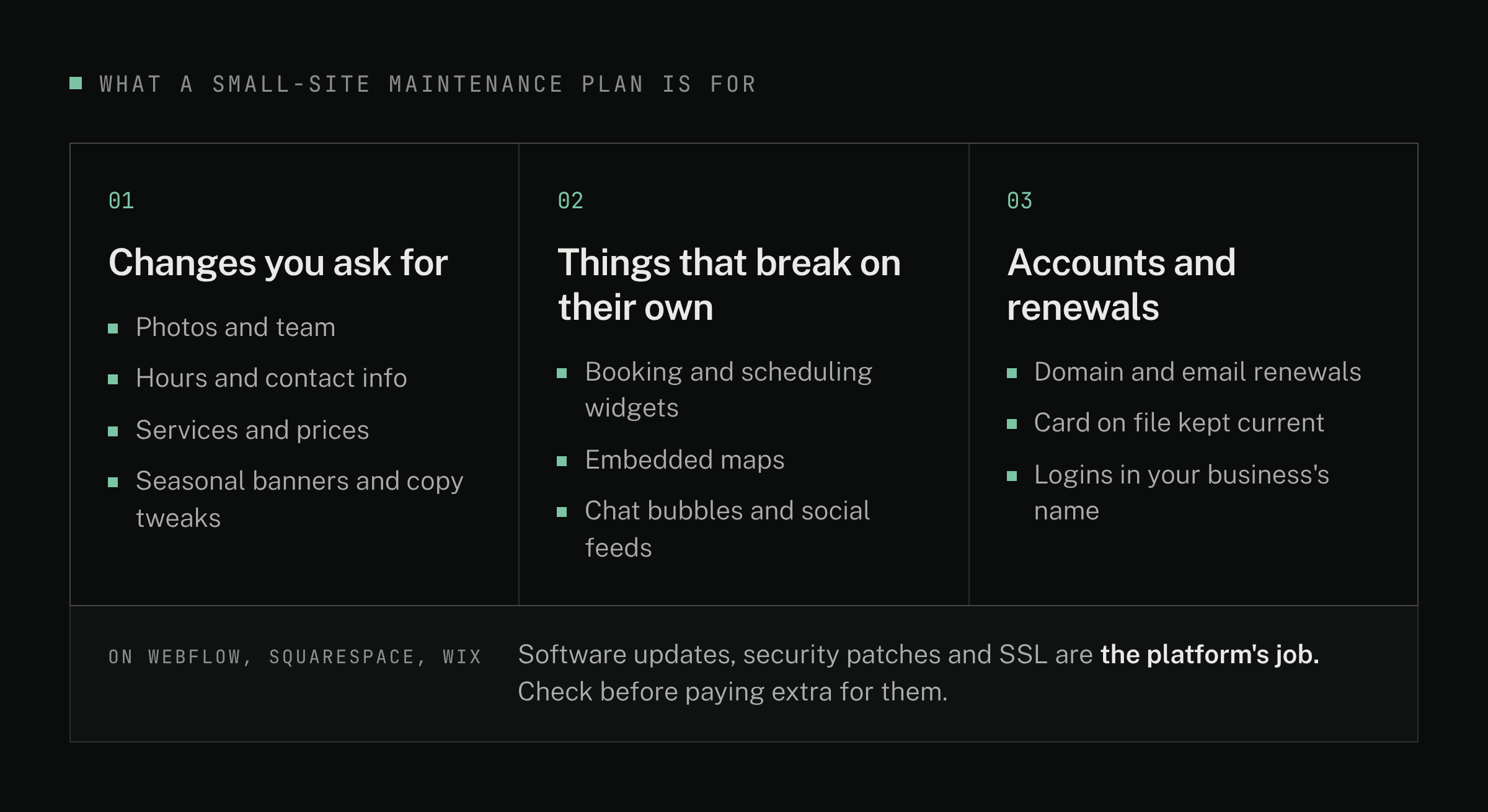
A good maintenance plan for a small business website covers three things: the basic changes you'll ask for, the parts of your site that other companies control, and the accounts and renewals that keep it online. Much of the usual checklist (software updates, security patches) is real work on a WordPress site that you or a developer run yourselves. On builders like Webflow, Squarespace and Wix, where one company runs everything, it's the platform's job, and you shouldn't be paying a developer extra for it.
Whatever plan you choose, your domain, website account and logins should stay in your name.
This is written from our work with small local and service businesses around Northern Virginia and DC, for owners who just launched a site or are comparing quotes that include "maintenance." Most of it applies just as well to small nonprofits. Short on time? The checklist of what to get in writing is near the end.
A note on scope: this is about marketing websites. Maintaining a custom web or mobile app (accounts, payments, app store updates) is a different job, and a different conversation.
Start with what your platform already does
Most maintenance checklists online were written for WordPress, where you or your developer keep the core software, theme and plugins (add-ons that add features) up to date. Hosted builders are different. Webflow, for example, says it applies patches and updates automatically, renews SSL certificates (the padlock that secures your site) and keeps backups you can restore from. (Webflow security, checked Oct 26, 2026.) Squarespace and Wix are hosted the same way: the software and servers are theirs to run.
Backups are where the platforms differ. Webflow and Wix let you restore an earlier version of your site, though on Wix that doesn't cover everything (store, booking and CMS collection content, for example). (Wix: restoring a saved version, checked Oct 26, 2026.) Squarespace has no revision history; it can only restore deleted pages and blog posts within 30 days, and it suggests keeping your own copies of your text and images. (Squarespace: troubleshooting lost content, checked Oct 26, 2026.)
If you're on a WordPress site you or a developer run, keep those items in your plan: updates, backups and security monitoring are real, recurring work there. Our platform comparison has a chart of who does the upkeep on each platform.
What it should include: the changes you'll ask for
In our experience, after a small business site launches, the requests come in four kinds:
- Photos and team. The most common. Someone joins or leaves, or it's time for a seasonal refresh.
- Hours and contact info. Holiday hours, a new phone number, a move.
- Services and prices. Adding a service, retiring one, updating what's offered.
- Seasonal banners and copy tweaks. A holiday notice, a seasonal offer, a reworded line or two.
These are small jobs, but they keep a site honest. New pages or sections come up too, but they're bigger jobs, usually quoted separately (more on that in the checklist below). One related chore: when your hours change, update your Google Business Profile too (the listing that shows up in Google Search and Maps). Google suggests confirming holiday hours there even when they match your regular ones. (Google: special hours, checked Oct 26, 2026.)
What it should include: watching the parts other companies control
Even a finished site depends on other companies.
Embedded tools change on their own schedule. Donation and sign-up forms, booking and scheduling widgets, embedded maps, chat bubbles and social feeds are often tools from other companies that appear inside your site. When one of those companies changes its product, your site can change with it. One real example: on December 4, 2024, Instagram's owner, Meta, switched off an older connection (the Instagram Basic Display API) that some website feed widgets used to show recent posts. (Meta for Developers, checked Oct 26, 2026.) Widgets that still relied on it stopped showing posts. Nobody touched those sites.
Domains and email lapse. Your domain (your web address) renews every year or few years. If the renewal fails, your website and your email can both stop working. For .com, .net, .org and similar endings, the company you bought the domain from (the registrar) must send reminders about a month and about a week before it expires, but only to the contact email on the domain's record. If that's an old employee's address, nobody sees them. (ICANN: Expired Registration Recovery Policy, checked Oct 26, 2026.) Other endings, like .io or .us, follow their own rules.
In our experience, lapses come from three places: the card on auto-renew expired, nobody remembers the login, or the domain, email and hosting all renew in different places on different dates.
The most common mistake: no plan at all
The site launches, everyone moves on, and nobody owns it. Nothing dramatic happens at first. It just starts to look dated: the team photo includes someone who left, last season's promotion is still up, the photos stop matching the business. In our experience, that's what owners notice first.
A plan doesn't have to be expensive or formal. It has to name who makes changes and who's watching.
What to get in writing
Whether it's a developer, an agency or someone on your own team or a volunteer, get these in writing:
- What kinds of requests are covered. In our view, for a small site, a list of request types ("photo and text updates, hours, seasonal banners, fixing a broken embed") is clearer than a bank of hours. You know what you're buying, and nobody's watching a meter.
- How fast you'll hear back. A written response time, and what counts as urgent (a broken form, donation page or booking link).
- Who watches the embedded tools and forms. Someone should notice when a widget stops working, and confirm form notifications go to an inbox someone still reads.
- Whose name is on the accounts, and who tracks renewals. Your domain, your website platform account (on Webflow, the Workspace and site plan) and any hosting should be in your business's or organization's name, with your developer added as a collaborator. The plan should say who keeps an eye on renewal dates.
- What isn't covered, and how it's quoted. New pages or sections, redesigns, new features and marketing work are usually quoted separately. That's fine, as long as you know up front.
- Which fees are separate. Hosting, domain renewals and paid widgets are billed by those companies. Some developers pass them through to you, and others bundle them into one price. Either way, ask which are included, for how long, and what each costs when it renews. Whether a plan is priced by request type or by hours, ask what a typical month costs you all-in.
- What happens if you cancel. You should keep the site, the domain and every login, with no fee to hand them over.
Where plans get padded
In our view, these line items are worth questioning on a hosted builder:
- "Plugin and core updates" or "security patching" on a platform that says it does this itself. Ask what, specifically, they'll update.
- "Backups" on Webflow or Wix, which already keep restorable versions. Ask what a separate copy adds. It can make sense for an export you keep off the platform, or for Wix store and CMS content that site history won't restore. On Squarespace, keeping your own copies is genuinely useful.
- Monthly reports that only list routine checks ("site up, backups OK"). A report is useful when it shows what changed or what was fixed.
None of these are wrong on a self-run WordPress site. The question is whether the work matches your platform.
Do you need a plan at all?
Not always. If you're comfortable making edits yourself, you may only need help now and then. On Webflow, that's what the content editor role is for, on a lower-cost Limited seat. Even then, put someone in charge of three things:
- Check your forms, booking links, maps and feeds a few times a year, and before your busiest season.
- Know where your domain, email and hosting renew, and keep the card and contact email current.
- Look at your site with fresh eyes each season: photos, team, hours, offers.
Want a second opinion?
Text us your web address and the plan or quote you've been offered, or just tell us what changes you expect. Not sure what platform you're on? We'll figure it out, and we'll tell you what's worth paying for, including what you can do yourself. Call or text Brandon at 240-971-9332, or use our contact page.
Have something
in mind?
Same-business-day reply · from a person, not an autoresponder