
Webflow vs WordPress vs Wix vs Squarespace in 2026
Which platform fits a small local business depends on its stage and who does the work. A plain-words comparison, with when to DIY and when to hire.
Brandon Long
October 13, 2026
Updated October 13, 2026. Plan details checked against each vendor's own site on that date.
Where we land: for something quick and temporary, Wix is fine. To build an attractive site yourself, Squarespace is a solid pick. If you're ready to invest seriously in your website as a tool to grow the business, we'd build it on Webflow. And if you already have a WordPress site that a good developer keeps up, there's often no reason to move.
This is for small local and service business owners around Northern Virginia and the DC metro choosing a platform for a new site or a rebuild. Short on time? Jump to the decision checklist near the end.
A note on scope: this guide is about websites, the place customers go to learn about you, see your work and get in touch. If you need a custom web application, like customer accounts, online booking tied to your own systems, or a dashboard your team works in every day, that's a different conversation. Picking a website builder is only a small part of that decision, and it's one we're happy to talk through.
Who's writing: Long Software's Brandon Long. We mostly build on Webflow, so we have a favorite, but we'll be straight about where the others win.
Start with a different question: what stage is your business in?
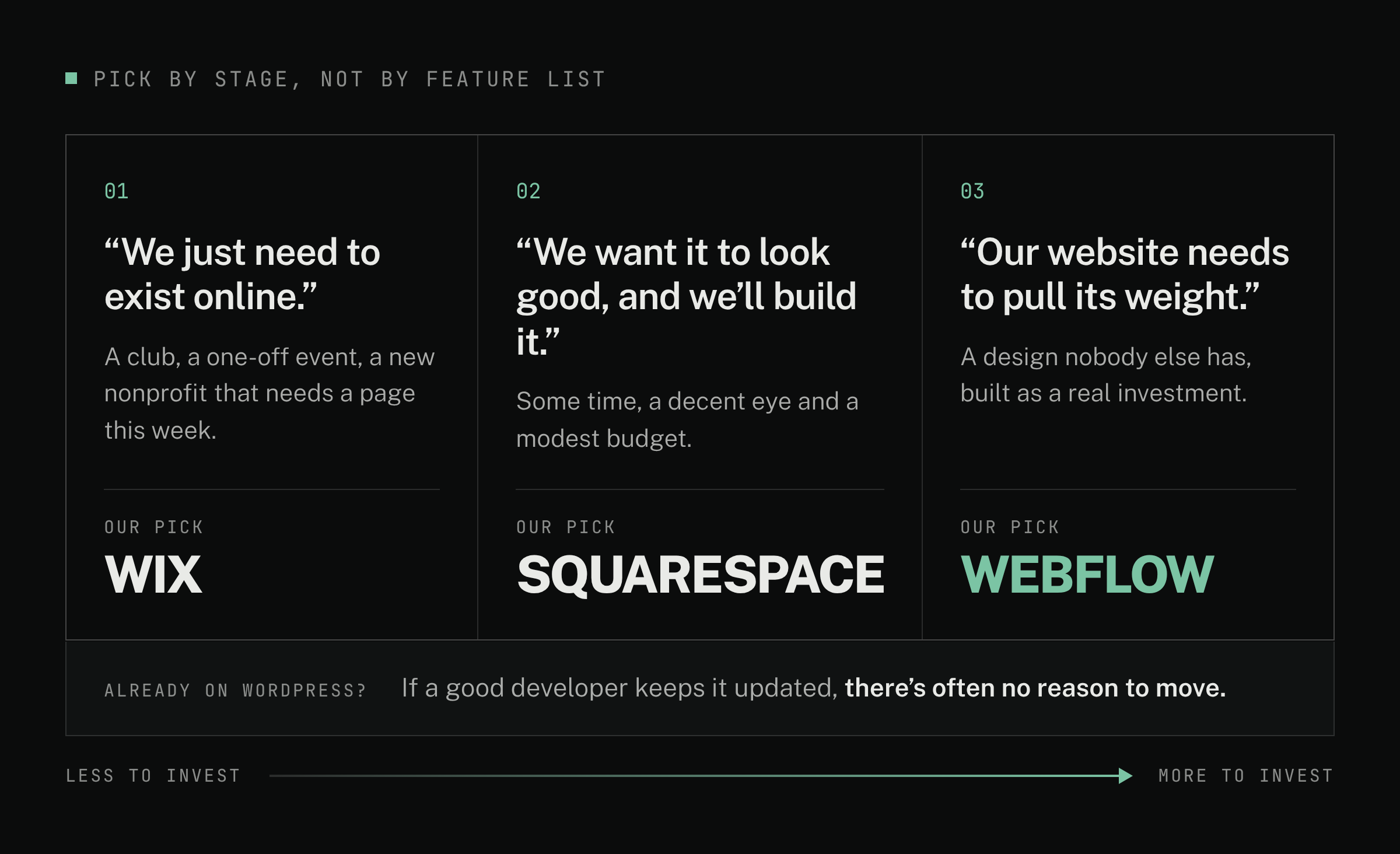
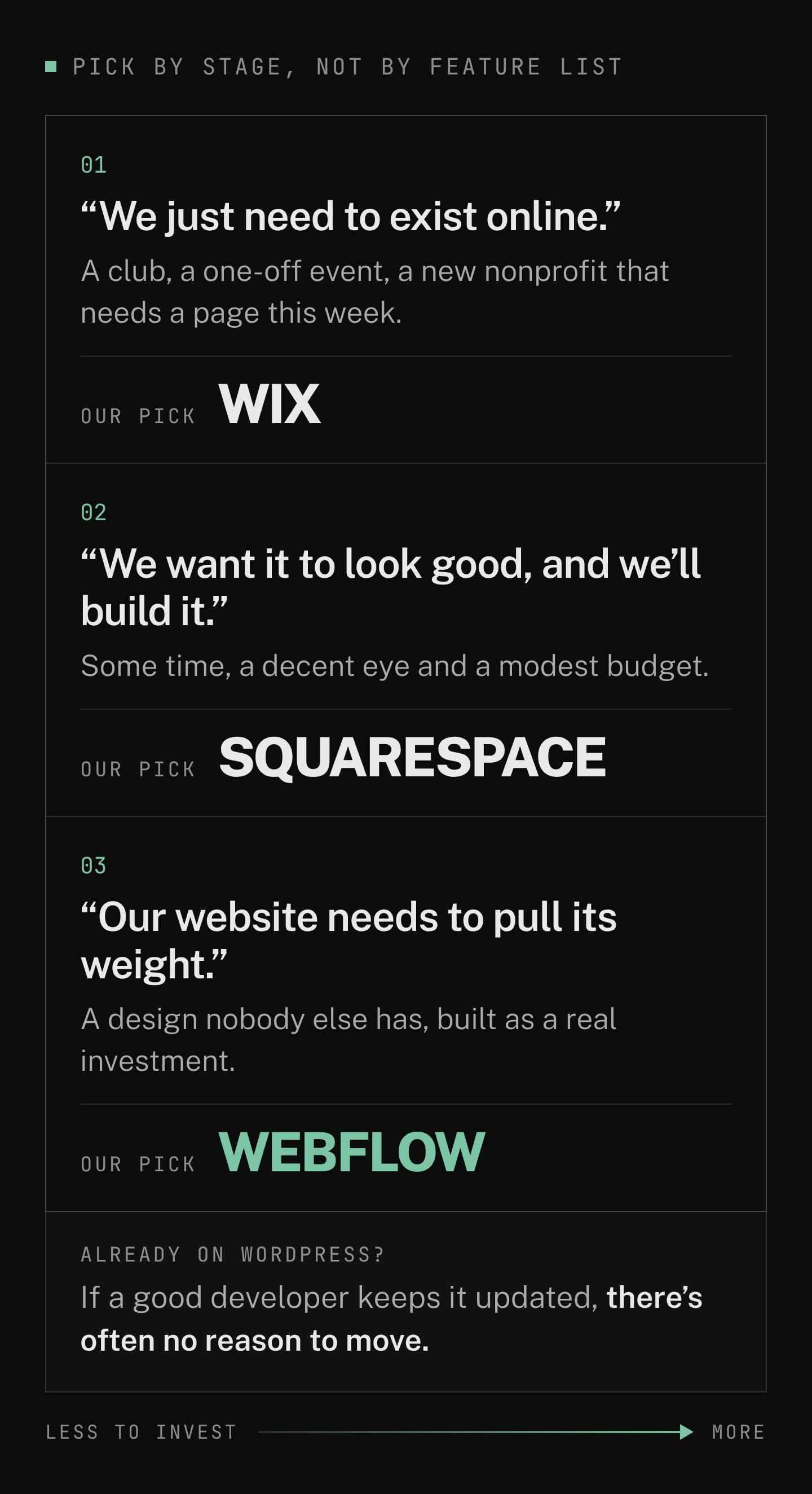
How much you're ready to put into your website, and who will do the work, decide this more than any feature list. Three stages:
- "We just need to exist online." A club, a one-off event, a brand-new nonprofit that needs a page this week.
- "We want something that looks good, and we'll build it ourselves." You have some time, a decent eye and a modest budget.
- "Our website needs to pull its weight." You want a design nobody else has, and you're ready to treat the site as a real investment.
Wix fits stage 1 best, Squarespace stage 2, Webflow stage 3. WordPress is a special case, covered below.
The four platforms side by side
Wix
- Stage it fits (our opinion): Stage 1, quick or temporary. A paid plan also works for many small businesses.
- Upkeep you own: your content; Wix runs the platform.
- Design freedom: templates you adjust in an editor.
- If you leave: the site only runs on Wix, so plan on a rebuild.
- How cost adds up: low-cost paid plans; the free plan shows Wix ads.
Squarespace
- Stage it fits (our opinion): Stage 2, a DIY site that looks good.
- Upkeep you own: your content; Squarespace runs the platform.
- Design freedom: templates with strong design tools.
- If you leave: some pages and one blog export; the design doesn't.
- How cost adds up: low-cost paid plans; no free plan, 14-day trial.
WordPress
- Stage it fits (our opinion): not a stage. Best when you already have a well-maintained site.
- Upkeep you own: self-hosted, you or your developer keep core, theme and plugins current. Managed hosting takes on part of that.
- Design freedom: almost anything, with a developer.
- If you leave: move the whole site to another host.
- How cost adds up: the software is free; cost depends on hosting, paid plugins and developer time.
Webflow
- Stage it fits (our opinion): Stage 3, custom design, ready to invest.
- Upkeep you own: your content; Webflow says it handles patches and updates.
- Design freedom: fully custom, usually with a designer or developer.
- If you leave: code exports without CMS content, forms or site search, so plan on a rebuild.
- How cost adds up: low-cost site plans; often higher once you add a Workspace plan and seats to edit (our experience).
Sources for each point are linked in the sections below. Export details: Wix and Squarespace, both checked Oct 13, 2026.
When does Wix make sense?
In our experience, Wix is great for a quick, temporary web presence: clubs, a single event, a new nonprofit's first page. Plenty of small businesses also run fine on a paid Wix plan.
The catch is the free plan. Wix's support page says free sites show Wix ads on every page and use an address like yourname.wixsite.com/yoursite. Removing the ads and connecting your own domain (your address, like yourbusiness.com) takes a paid plan. (Wix: upgrading your site, checked Oct 13, 2026; current plans on Wix's pricing page.)
The most common Wix mistake we see is a business staying on the free plan. To a customer comparing a few local businesses, ads and a wixsite.com address can make yours look less established. Pay for a plan.
When is Squarespace the right call?
In our opinion, Squarespace is a solid do-it-yourself option: its design tools are good enough that an owner with little web experience can end up with a genuinely attractive site. Every plan includes designer templates and a free SSL certificate (the padlock that secures your site). There's no free plan, just a 14-day free trial. (Squarespace pricing, checked Oct 13, 2026.) If you're in stage 2 and enjoy this kind of work, it's a reasonable home.
What's the sign you've outgrown a DIY builder?
It isn't search. Wix and Squarespace both let you set page titles, descriptions and web addresses, the SEO (getting found on Google) basics. (Wix SEO settings; Squarespace SEO checklist; both checked Oct 13, 2026.)
What you outgrow is the template-first approach. The moment usually looks like this: you want a unique, custom design, pages structured around how your customers search for and choose a business like yours, and someone accountable for both. You're ready to seriously invest in your online presence, and a template many other businesses also use only goes so far.
Is WordPress still a good choice?
WordPress is the most widely used CMS (software for managing site content): about 40% of all websites, per web-technology survey firm W3Techs (W3Techs, checked Oct 13, 2026). It's free, flexible, and there's a plugin (an add-on that adds features) for almost anything.
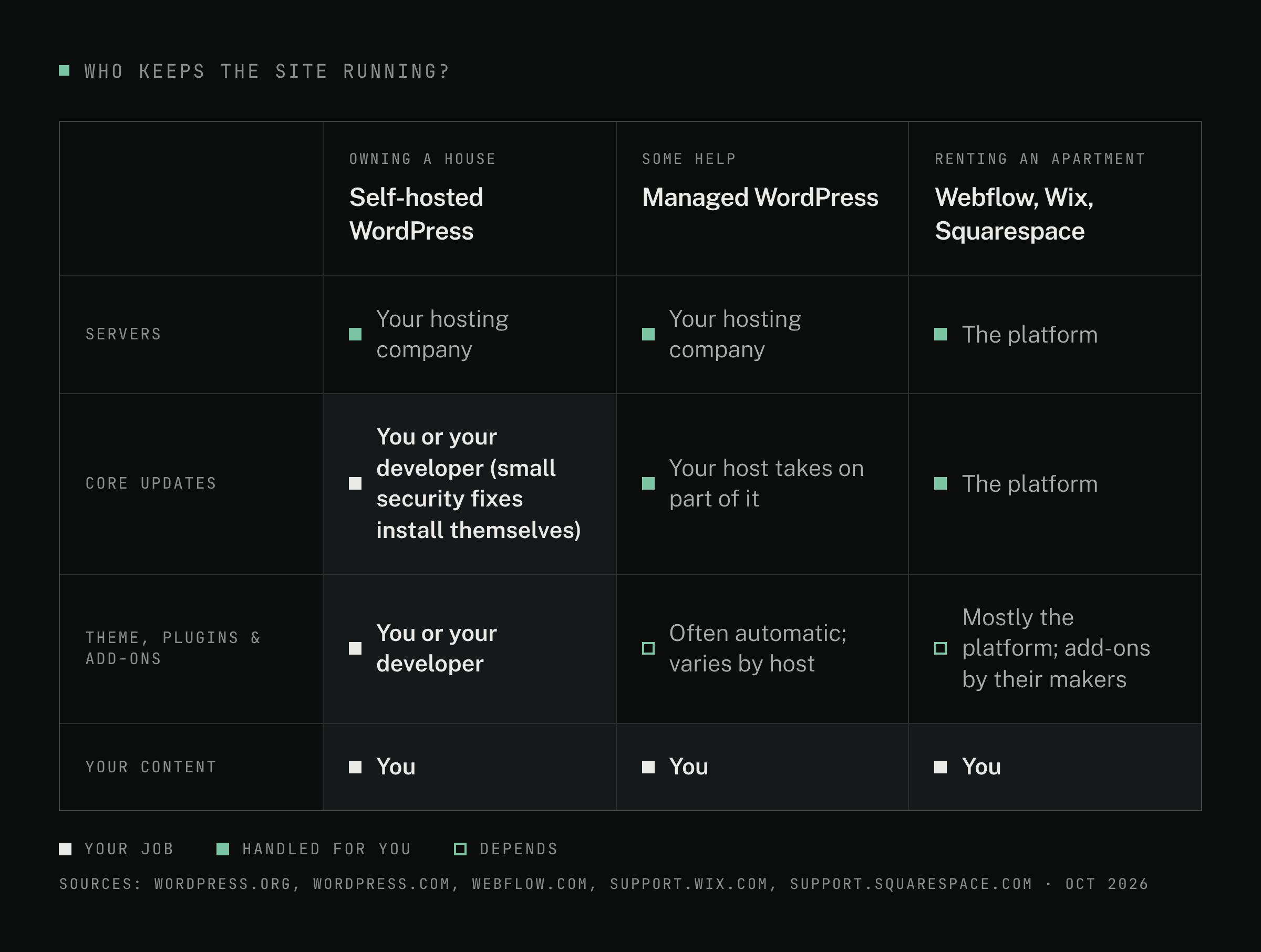
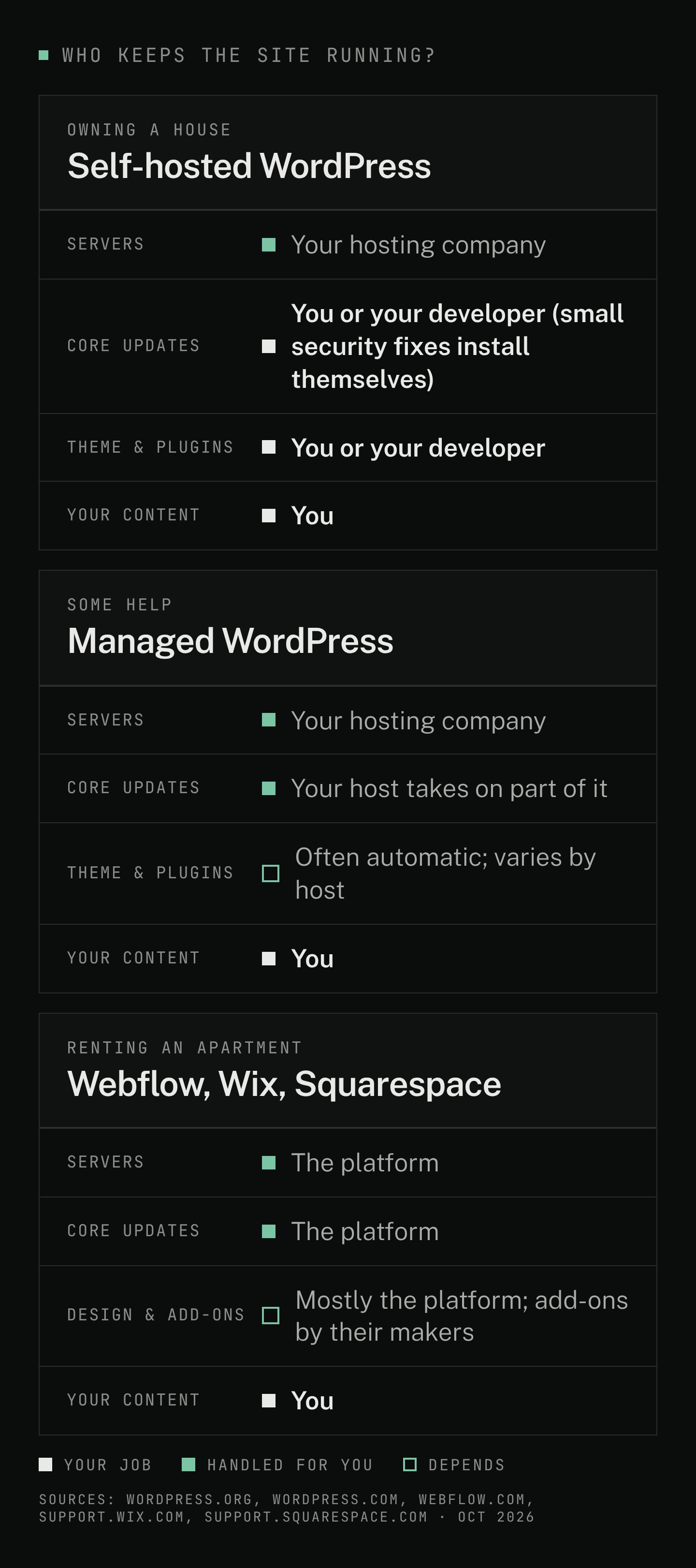
That flexibility comes with upkeep. Running "self-hosted" WordPress (installed on hosting you rent) is a bit like owning a house rather than renting an apartment:
- Your hosting company (the service that runs your site) looks after the building: the servers.
- You or your developer look after everything inside: the WordPress software itself (the "core"), your theme (the site's design package) and every plugin.
- Small security updates to core install themselves on most sites. Plugins and themes can be set to auto-update too. (Updating WordPress; plugin and theme auto-updates; both checked Oct 13, 2026.)
- Managed WordPress hosting can take more off your plate. WordPress.com, for example, lists automatic core updates and security protections on its plans. (WordPress.com pricing, checked Oct 13, 2026.)
Even so, WordPress's own security guide says a lot of security "lies on the website owner," and lists outdated plugins among the things attackers go after. (WordPress hardening guide, checked Oct 13, 2026.) It's manageable; it's just a job someone has to own, including fixing what an update breaks.
Our honest take: today, we'd rarely start a new local-business site on WordPress. The overhead of managing WordPress and its ecosystem of third-party plugins isn't worth it to us anymore, now that Webflow exists at the scale it does.
WordPress is still a reasonable choice when:
- You already have a WordPress site that works, and a good developer keeps it updated.
- You depend on a specific plugin that does something you can't easily get elsewhere.
- Your team already knows WordPress and has a maintenance routine.
Moving a healthy site just to change platforms isn't always worth the cost and disruption.
When is Webflow worth it?
Webflow is a visual website builder with hosting included. Why we pick it:
- Less to maintain. Webflow says it applies patches and updates with no customer maintenance and that it removes the plugin patching other platforms need. It lists SSL and DDoS protection (defense against traffic floods) for all hosted sites. (Webflow security, checked Oct 13, 2026.)
- Custom design without fighting a template. A designer or developer can build the exact layout the business needs.
- Useful built-ins. In our experience, built-in forms, a CMS for blog posts and service pages, and Webflow's apps marketplace cover what local-business sites need, and they're regularly supported.
The trade-offs, stated plainly:
- It can cost more. Webflow bills a site plan (hosting, per site) separately from a Workspace plan (your team's account) and any extra seats (a login for one person). In our experience, once you add the plan a business site needs and the seats to edit it, Webflow usually runs higher than Squarespace or Wix. Compare on Webflow's pricing page (checked Oct 13, 2026).
- Seats are limited. A Workspace includes one full seat for the owner. You can add full seats, cheaper "limited" seats for people who only edit content, and free seats for reviewers. Freelancer and agency plans include free client seats per site. (Same pricing page.)
- Leaving means rebuilding. You can export your site's code on a paid Workspace plan, but CMS content, form processing, site search and other hosted features don't come with it. (Webflow code export, checked Oct 13, 2026.) WordPress, by contrast, can move between hosts.
Our view: for the sites we build, the reliability has been worth the extra cost, and most small teams don't need many editors, so the seat limit rarely matters. In our experience, though, Webflow isn't the easiest platform to learn on your own.
Should you build it yourself or hire someone?
Technically, anyone can build a website now. But web design is its own specialty, and most owners haven't trained in it, any more than most web designers know how to run your business. A pattern we see often: an owner DIYs because the tools exist, then ends up with a site that doesn't look the way they hoped.
DIY makes sense when the site is temporary, the budget is tight, or you enjoy design and have the time. Hire when the site is a main way customers find and judge you, and you'd rather spend your hours running the business.
What drives the cost of a hired build: how many pages, whether the design is custom or adapted from an existing one, who writes the words and supplies the photos, and extras like booking, forms or a blog. The platform's hosting is a separate, ongoing fee you pay the platform.
Your time: even when you hire, plan to gather your content (services, photos, reviews, bios) and give feedback. In our experience, that's often the slowest part.
If you hire someone, what should you insist on?
On any platform:
- Your domain is registered in your name, with a login you control.
- The site and hosting account belong to your business. Your developer works in it as a collaborator.
- You get the logins and a short handoff, so another developer could pick it up if needed.
- Everyday edits are easy, whoever makes them. Hours, photos, services and blog posts should change without touching the design. You can make them yourself (on Webflow, that's what a content-editing seat is for) or send them to your developer.
If a developer won't agree, keep looking.
Our picks, by situation (opinion)
- Quick page for a club, event or new nonprofit: Wix, on a paid plan if people need to trust it.
- DIY site for a small business on a modest budget: Squarespace.
- Existing WordPress site that's well maintained: keep it, unless it's holding you back.
- New site or rebuild for a business ready to invest: Webflow, built by an experienced Webflow designer or developer, set up so everyday edits are easy, whether you make them or your developer does.
Quick decision checklist
- Is this site temporary or long-term?
- Will customers judge my business by this site before they call?
- Do I want a custom design, or is a good template enough?
- Who will keep the site updated, including plugins and security?
- How many people actually need to edit the site?
- Do I have the time and design skill to build it well myself?
- If I already have a site, is it holding me back, or does it just feel old?
Mostly "temporary"? Stage 1. Long-term, a template is fine and you'll do it yourself? Stage 2. Long-term, custom, and you'd rather not do it yourself? Stage 3.
Not sure which fits?
Plenty of businesses land on Squarespace or Wix, and that's a good outcome. If you'd rather have it handled, call or text us at 240-971-9332, or reach out through our contact page. Tell us what you have and what you need, and we'll give you a straight answer, including when a DIY builder is the better fit.
Have something
in mind?
Same-business-day reply · from a person, not an autoresponder